
HR & Payroll API
1. Getting started: gain access
In order to grant access to the HR & Payroll API, we will need a general e-mail address to which we can send the necessary access information:
Account creation on the Securex Developer portal
Client Secret and ID to gain access to the HR & Payroll API
Once this information is received, you can start setting up access to our APIs through the developer portal.
The following steps must be completed twice: once for Acceptance-environment for testing, once for Production-environment before go-live.
1.1. Development Portal
Url for Acceptance: https://securexacc-portal-api.securex.eu/
Url for Production: https://portal-api.securex.eu/
Once you gain access to the api-developer portal, you can navigate to the page

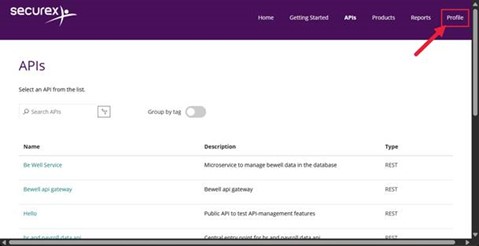
Select ‘hr and payroll data’ from the list to browse the openapi spec.
Next click on the ‘Profile’ tab in the top of the page.
In the Profile page, you will see your subscription to the ' SSS - HR and Payroll data ' product.
Click on the ‘Show’ link next to the primary or secondary key to see the value of your subscription key.
You can use either of the keys.
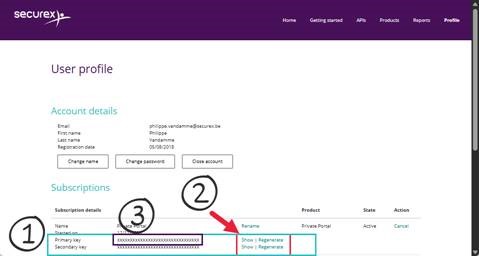
With every call to the api you make, you will need to provide this apiKey as a header parameter with name: ‘Ocp-Apim-Subscription-Key’
1.2. ClientId/Secret
In order to make the calls successful, you will also need to authenticate to our IAM-system first.
Procedure:
Perform a POST call to https://logon.securexacc.eu/adfs/oauth2/token for Acceptance environment.
Same call to https://logon.securex.eu/adfs/oauth2/token for Production environment.
The POST contains the following x-www-form-urlencoded keys:client_id: provided by Securex
grant_type: client_credentials
client_secret: provided by Securex
The client application receives an access token.
The access token itself is a JWT token. The JWT token can then be decoded. You can test this at https://jwt.io/
The access token can now be used to do subsequent calls
After a while, the access token will expire and become invalid. Then a new access token can be obtained by repeating this flow.
Each call to the api should have the following Headers:
Ocp-Apim-Subscription-Key: <apiKey>
Authorization: Bearer <accessToken>
For testing purposes, we provide an acceptance-environment with testdata related to one of our mutual customers. Access to each new customer (firm/company) needs to be requested.
2. Good to know
2.1. Data levels
There are three datalevels possible:
Firmlevel indicated by firmNumber
= data related to the company. Each firmNumber corresponds with a legal company.
FirmNumber is needed to retrieve/update company-level information and to start monthly payroll (see later)Employee level indicated by employeeKey
= data related to an employee in the company
Each employee has a unique key within one company (= firmNumber)
Contract level indicated by contractKey
= data related to the contract of an employee within the company. An employee can have multiple contracts within the company, therefore multiple contractkeys for an employee are possible.
Contractkeys are used to get or change contract data and to start monthly payroll (see later)
2.2. Asynchronous feedback and downtime
POST/PUT/PATCH/DELETE operations are processed asynchronously.
This means these endpoints will capture the request, do some basic validation and if all is ok, place them on a queue for further processing. The consumer gets an error response when the validation fails or a technical issue appears, otherwise a response code 202 is returned when the message is placed on the queue. This means that a corresponding GET-call might not immediately reflect the change that was just passed on.
During the evening and night, there are 2 short downtimes on our mainframe, when switching from online mode to batch mode and back. During these switching times, most of the get endpoints will fail with a response code 5xx. Updates will in most cases be accepted with a 202 Accepted, but will be residing a bit longer on the processing queue.
General Downtime
Every month, on the Tuesday after Microsoft Patching Tuesday, the APIs won’t be available all night (00:30 till 05:30) due to server os patching .
POST/PUT/PATCH/DELETE operations will return a response code 202 accepted.
This means the request is accepted and will be processed asynchronously, a get will not necessarily immediately reflect the change that was just sent through the API.
2.3. Retrieve employee- and contract information
The best way to receive the contract key for a contract, is by using the GET employees call
/bel/firms/{firmNumber}/employees
This call gives you an overview of all the employees and their contracts, based on contractkey and start date.
You can use the nationalregisternumber as a parameter to filter the call. For this employee, you will then receive a list of the contracts with their start date and their contractkey.
If you want more information about the contract itself, you can use the contractkey in the Get Contract or Get contractviews endpoint.
You can retrieve all employees who have had an active employment contract with the company in the last 90 days. Note that only the employees for which Securex calculates the wages will be available. Temp workers or hired consultants for example won’t be included in this call.
Pagination
For pagination purposes, the response contains a boolean value ‘allEmployeesRetrieved’ or ‘allContractsRetrieved’ which indicates if all available employees or their contracts were retrieved. Next to this the attribute ‘lastEmployeeKeyRetrieved’ or ‘lastContractKeyRetrieved’ contains the value of the last retrieved employee or contract in this call.
If the boolean value is false, the API can be called again using the additional request parameter ‘_after’ containing the last key that has been retrieved in the previous call.
This process can be repeated until the value is true.
Histories
The _from parameter is used exclusively for the retrieval of historic information. When passed, the history active on this date and all following histories will be returned. It is limited to a value in the past >= 01-01-[current year - 2] .
e.g. GET /bel/firms/{firmNumber}/contract-views
If a fromDate is provided for a call made during 2020, the fromDate results will be limited to data corresponding to a fromDate = 2018-01-01, older data will not be returned.
If all query parameters are omitted, the API will respond as if it was called with a fromDate = current date. Data is only accessible for contracts that were active less or equal to 90 days in the past, unless specified by an employee- or contractkey.
2.3. Start a payroll
To start a (monthly) payroll calculation with Securex, a workorder needs to be send for each firm/company for the specified payroll period through /bel/firms/{firmNumber}/work-orders
The workorder contains the payroll information needed to calculate the (monthly) wages for all employees included.
Therefore, the workorder needs to contain three types of payroll information:
Prestations
The hours worked or absent for each employee. This is the basis for the payroll calculation
Worked hours: the hours performed by an employee on a specific day
Absences: if applicable, the absence periods of an employee
Overtime: if applicable, the overtime an employee has performed
The available prestation codes for each firm can be retrieve by using /bel/firms/{firmNumber}/prestation-codes
Additional payments
If applicable, extra remuneration to be paid out to the employee, on top of their wage package (extra bonus, reimbursement of costs,..)
Available wage components can be retrieved by contacting Securex
Commute
If applicable, the type of commute that has been used by the employee. In order for this to work, a company-specific set-up is needed at Securex side.
Before the workorder is sent to Securex, make sure all relevant employee and contract updates, applicable during the workorder period, have already been sent to Securex.
If not, it is possible we need to perform corrections to process the updated information, which comes at an extra cost for the customer.